Install script
macOS and Linux.
curl -fsSL https://scaleguard.dev/install.sh | sh
scaleguard statusOpen-source application gateway
Load balancer, WAF, auto-HTTPS, DNS and tunnels in one JAR. One command to start.
$ curl -fsSL https://scaleguard.dev/install.sh | sh
$ ./scaleguard-docker.sh
$ ./scaleguard-docker.sh up --postgres
Then open localhost:8080/adminui. Admin password is generated.
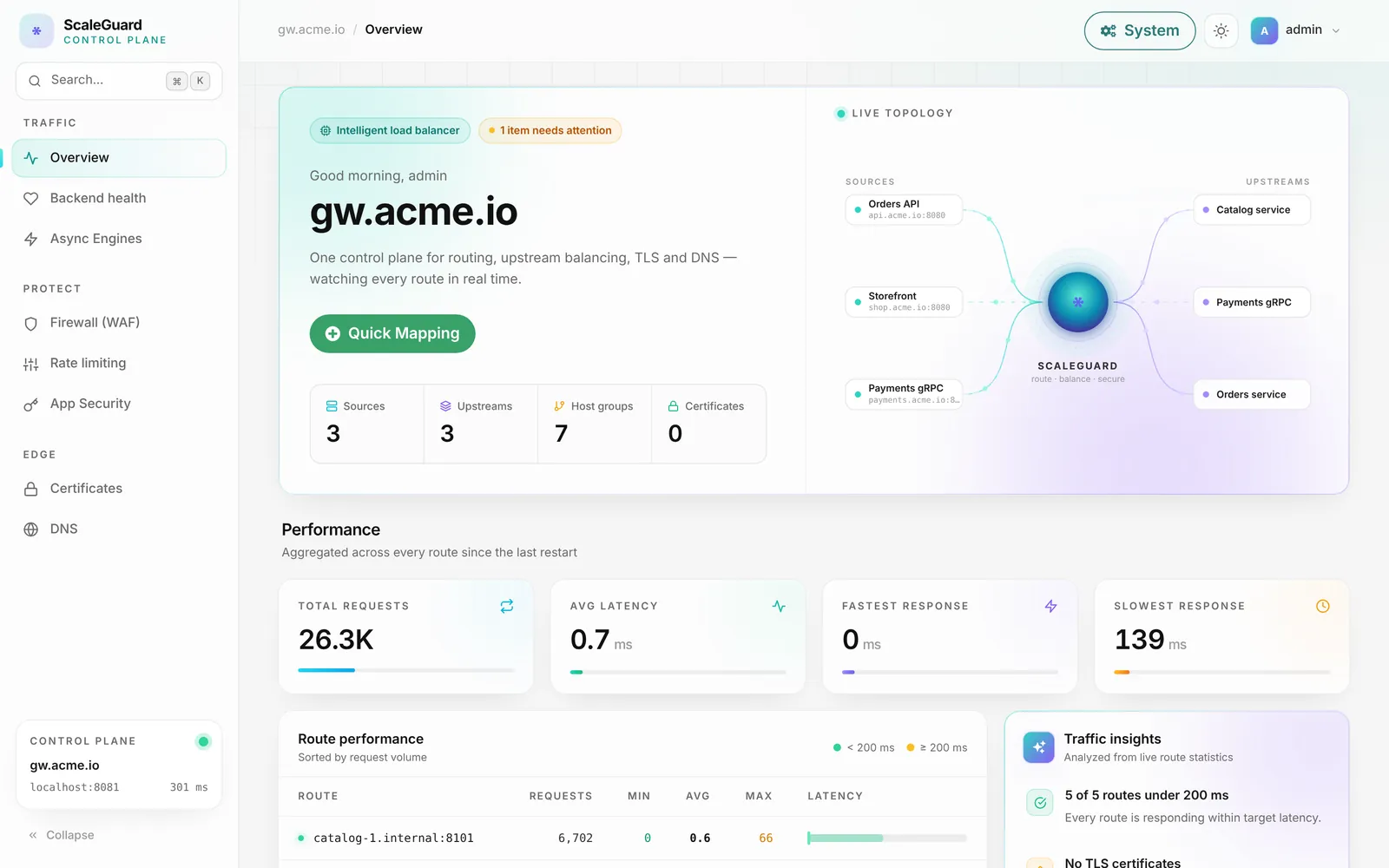
Control plane
Routes, certificates, firewall, rate limits, DNS and cluster health in one web UI, with the same operations over a REST API.

Why ScaleGuard
Eight tools, eight configs. ScaleGuard is all of them in one process, configured live.
A story · internal apps
From “nobody knows what is exposed” to one front door. An illustrative team, seven steps.
Dashboards, admin panels, a staging API, a wiki. Each on its own port, with its own login and its own expiring certificate.
One command installs ScaleGuard. Each app gets a named HTTPS route with Quick Mapping, and the apps stop listening to the world.
Each route has its own allow-list. Partners get scoped OAuth tokens that can be revoked on their own.
A per-route WAF, rate limits and one-click blocks. Abuse gets a 403 or 429 and the app never sees it.
safeexpose 3000 demo publishes it as a normal route, behind the same rules. Ctrl+C removes it.
Small endpoints and webhooks become cloud functions in the admin UI, with no new service to patch.
Every request is logged and searchable with SQL. A second node keeps the front door up through restarts.
How it works
Every request passes the same checks, in the same order, whether it is proxied to a backend, answered from the cache or handled by a cloud function. Pick a scenario and watch where it goes.
GET /api/orders 200 backend:10.0.0.5:3000 12.4msEvery request is recorded in the built-in analytics (DuckDB) with a trace ID you can search and query with SQL.
Get started
Java 21 or Docker. No config files.
One command. It generates your admin password.
$ curl -fsSL https://scaleguard.dev/install.sh | sh
==> Java 21 found
==> Downloading release
==> Checksum OK
==> Generated an admin password: ••••••••••••••••••••
==> ScaleGuard is installed
Admin UI : http://localhost:8080/adminui/Sign in at /adminui.
Pick a domain, list backends. HTTPS is automatic.
$ curl -X POST "http://localhost:8080/config/quickmapping?scaleguard=true" \
    -H "Authorization: $TOKEN" \
    -d '{"name":"app",
         "sourceURL":"https://app.example.com",
"targets":["http://10.0.0.5:3000","http://10.0.0.6:3000"]}'macOS and Linux.
curl -fsSL https://scaleguard.dev/install.sh | sh
scaleguard statusOne script. Add --postgres or --dns.
./scaleguard-docker.sh
./scaleguard-docker.sh up --postgresPublish a local port at your own domain.
safeexpose 3000
→ https://app-3000.your-domain
Flagship · SafeExpose
SafeExpose is the open-source, self-hosted alternative to ngrok that ships with ScaleGuard. It publishes a service from your laptop or a private network at your own domain, with automatic HTTPS, through the same gateway that protects the rest of your infrastructure.
safeexpose 3000 and your local app is live. Name it with safeexpose 3000 demo.Fully open source, MIT. Client and server are both on GitHub. Read it, fork it, run it on your own infrastructure. github.com/dhaneeshtb/scalegurad-safeexpose
$ safeexpose 3000 demo
Exposing localhost:3000 at https://demo.tools.example.com
(Ctrl+C to stop; it reconnects by itself if the network drops)
Tunnel up: localhost:3000 -> router.example.com:50001
Connection lost (link went quiet). Reconnecting in 2 s...
Tunnel up: localhost:3000 -> router.example.com:50001$ curl -fsSL https://raw.githubusercontent.com/dhaneeshtb/scalegurad-safeexpose/main/install.sh | sh
Everything included
No plugins, no paid tier. One open-source build.
HTTP/1.1, HTTP/2, HTTP/3, gRPC, WebSockets and TCP. Health checks, retries and routing by host, path or header.
Per-route policies, your own rules and OWASP CRS import. 44 of 44 test attacks blocked.
Per-client limits, IP allow/deny lists and timed blocks, shared across the cluster.
Let's Encrypt certificates for every route, ordered and renewed for you.
Host your zones on the gateway. Served names answer with every node's IP.
Open-source, self-hosted ngrok alternative. safeexpose 3000 and you are live. See how.
Every request lands in embedded DuckDB. Dashboards, latency and a SQL console, with no log stack.
Every node serves traffic. Automatic master election and a standby site. Break a node and watch.
Answer a route with a sandboxed Groovy function instead of a server. See an example.
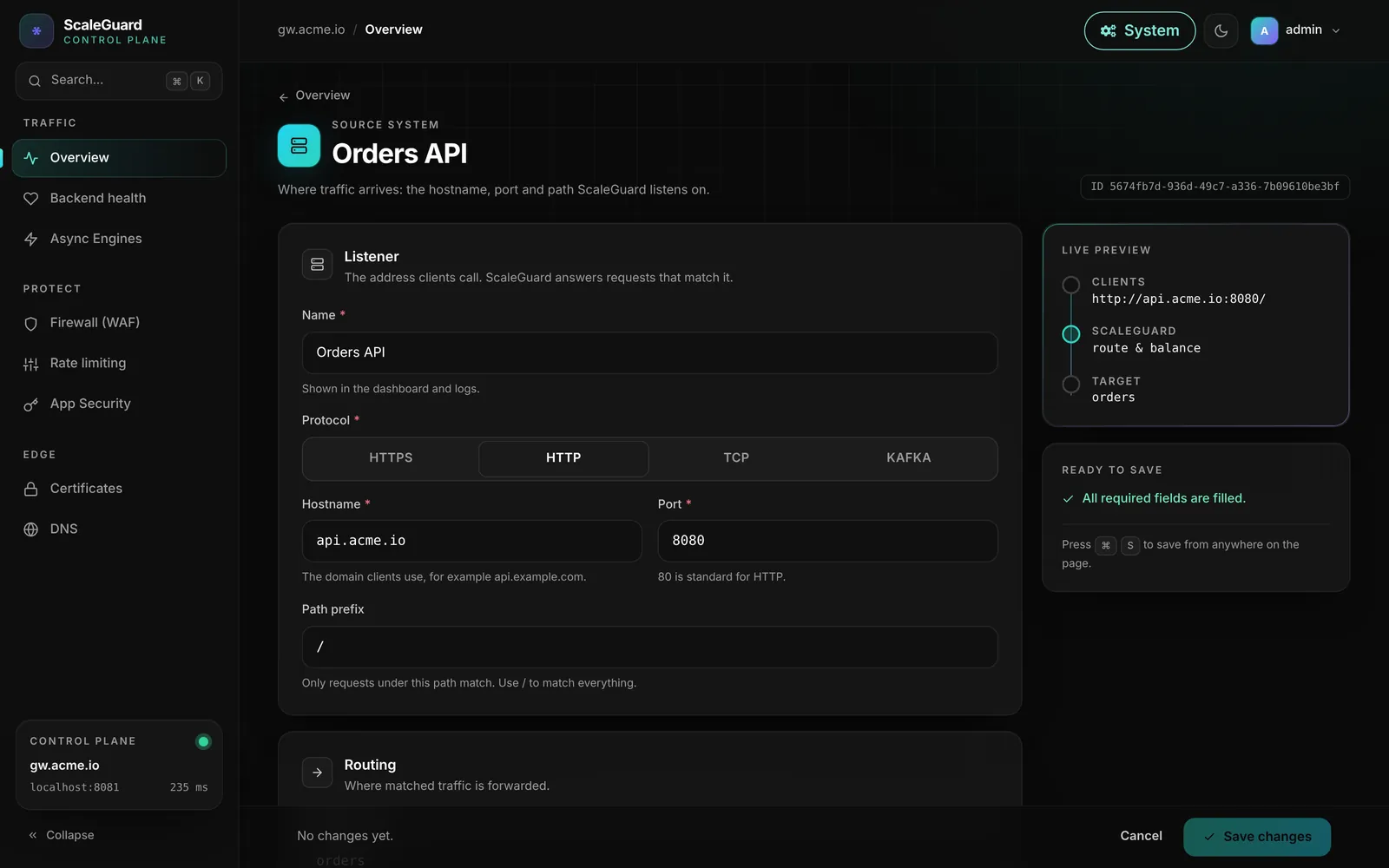
The admin UI
Every setting is editable live, and nothing needs a reload. The same operations are available over the REST API.
Cloud functions
Write a small Groovy function in the admin UI and attach it to any route. headers, query and the parsed body are just variables. It inherits the route's auth, rate limit, WAF, CORS and caching, and runs in a sandbox.
Functions share the gateway's JVM, so treat authors as trusted staff. Read exactly what the sandbox does and does not guarantee.
// headers, query and body are ready-made variables
def r = http.get(
"https://api.open-meteo.com/v1/forecast" +
"?latitude=${query.lat}&longitude=${query.lon}" +
"¤t=temperature_2m")
if (!r.ok) {
return res.status(502).json([error: 'upstream ' + r.status])
}
return [temperature: r.json().current.temperature_2m]High availability & disaster recovery
Every node serves traffic. A majority elects the master. A standby site takes over with one call. No shared database, no etcd.
Measured on local test clusters: new master in 2.9–3.8 s. Tested behaviour.
Add a node, add capacity. Lose one, lose only its share.
Config changes go into a tamper-evident hash chain on every node.
A master needs a majority. A cut-off minority keeps serving but accepts no changes.
If the primary site is lost, POST /cluster/dr/promote (or one button) makes the DR site primary.
Rate limits, refresh tokens and analytics are cluster-wide.
Same admin login on every node. Use an odd number (3 or more) of voting nodes. DR nodes add one flag.
# three active-active nodes: each lists the other two
$ java -Dport=80 -Dscaleguard.nodeName=a \
    -Dscaleguard.cluster.advertise=http://10.0.0.10:80 \
    -Dscaleguard.cluster.peers=10.0.0.11:80,10.0.0.12:80 \
    -DadminUser=admin -DadminPassword=… -jar scaleguard.jar

# a DR node in another region
$ java … -Dscaleguard.cluster.dr=true \
    -Dscaleguard.cluster.advertise=http://10.1.0.10:80 \
    -Dscaleguard.cluster.peers=10.0.0.10:80,10.0.0.11:80,10.0.0.12:80 \
    -jar scaleguard.jar

# after losing the primary site
$ curl -X POST http://10.1.0.10/cluster/dr/promote?scaleguard=true
Performance
Built on Netty with io_uring, epoll or kqueue picked automatically. Same backend, same wrk, 64 keep-alive connections, one CPU core each, small responses (October 2026).
Where the C proxies are ahead: tail latency (JVM garbage collection; p99 about 8 ms vs 2.6 ms) and memory (about 200 MB with a 256 MB heap vs 15–25 MB). Results drift between runs, so each proxy is a share of NGINX measured in alternating runs. Methodology and how to reproduce.
How it compares
Out of the box. Checked October 2026.
| Capability | ScaleGuard | NGINX OSS | HAProxy | Traefik | Caddy |
|---|---|---|---|---|---|
| L7 load balancing & reverse proxy | Yes | Yes | Yes | Yes | Yes |
| HTTP/3 (QUIC) | Yes | Yes | Yes | Yes | Yes |
| Web application firewall | Built in, per route | Module | Enterprise | Plugin | Plugin |
| OWASP CRS with anomaly scoring | Import in the UI | Module (ModSecurity) | Enterprise | No | Plugin |
| Request analytics with SQL | Built in | Logs only | Logs only | No | No |
| Multi-node config sync, shared rate limits | Built in | NGINX Plus | Partial | Hub | No |
| Authoritative DNS server | Yes | No | No | No | No |
| Self-hosted tunnels (ngrok-style) | Yes | No | No | No | No |
| Web UI that edits configuration | Yes | No | No | Read-only | No |
| Live changes via API, no reload | Yes | NGINX Plus | Partial | Yes | Yes |
| Open source | MIT | Yes | Yes | Yes | Yes |
NGINX and HAProxy are ahead on hardening and per-request overhead. ScaleGuard's edge is breadth in one process.
Questions
A free, open-source application gateway in one Java process: load balancer, reverse proxy, WAF, rate limiting, automatic HTTPS, DNS, tunnels, analytics and cloud functions, configured from a web UI or REST API.
On macOS or Linux run curl -fsSL https://scaleguard.dev/install.sh | sh. With Docker, run ./scaleguard-docker.sh from a clone. Both generate an admin password and serve the admin UI at /adminui.
Java 21 or newer, or Docker. SQLite by default, PostgreSQL optional. Cache and analytics use embedded DuckDB, so there is no other server to run.
Yes. MIT license, no paid tier.
About 93% of NGINX throughput in one-core small-response benchmarks. NGINX and HAProxy are ahead on tail latency, memory and hardening. ScaleGuard adds a UI, WAF, analytics, DNS, tunnels, clustering and functions without extra modules.
Yes. Each app gets a named HTTPS route with IP allow-lists, scoped OAuth tokens, a WAF, rate limits and a request log. It is not a single-sign-on provider for people.
Yes. SafeExpose is the open-source (MIT) tunnel client: safeexpose 3000 publishes a local service at your own domain with HTTPS. Code: dhaneeshtb/scalegurad-safeexpose.
Yes. Run three or more active-active nodes with automatic master election and no shared database. A standby DR site can be promoted with one call. If a node fails, the others keep serving.
They run in a layered Groovy sandbox with no file, process or thread access, hard limits, and network calls off unless the admin allows hosts. They share the JVM, so they are not a hard security boundary; trust their authors.
One command. A web UI. Everything on your own servers.
$ curl -fsSL https://scaleguard.dev/install.sh | sh